
Export your connections, hand them to AI, get leads.
I have 6,339 connections on LinkedIn. Somewhere in that pile are people who could buy what I sell, or who know someone who could. Scrolling through them by hand is unpleasant and takes forever.
I sell entrepreneurship programs to chambers of commerce and economic development organizations. LinkedIn does a terrible job of surfacing the buyers in these organizations. You can search your connections by name or company, which only works if you already know who you’re looking for. There’s no button for “which of my 6,000 people run economic development for a city?”
There’s a much faster way to mine your LinkedIn for people who could be your customer, or who know someone who could. Export your connections, hand the file to Claude (or ChatGPT, or whatever you use), tell it what you sell, and let it do the scrolling for you. LinkedIn takes about a day to send you the file. After that, the whole thing takes fifteen minutes. This works best if you sell through conversations, not ads.
Step 1: Get your connections out of LinkedIn
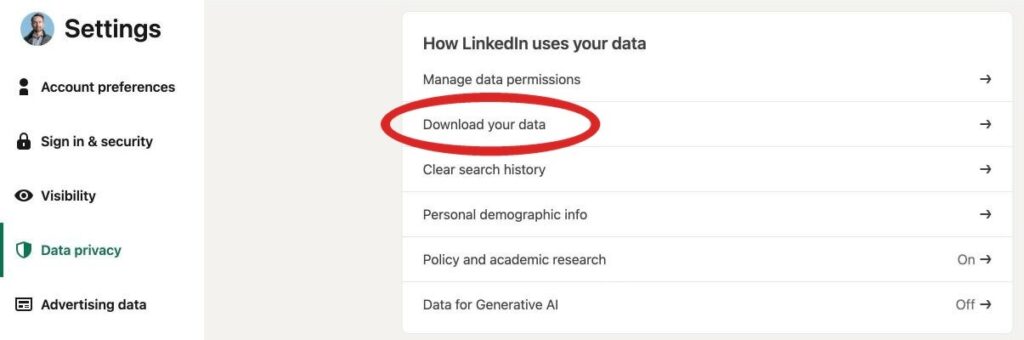
On a computer, open LinkedIn and click Me (under your profile picture), then Settings & Privacy. Go to Data privacy, then “Download your data.”
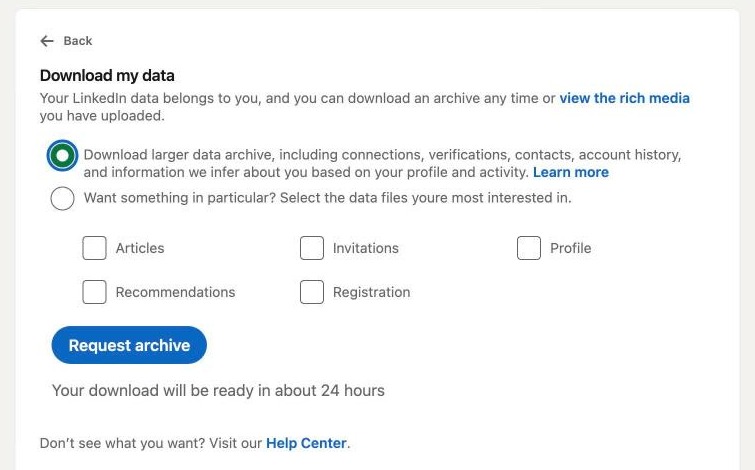
You’ll see two options. The second one lets you pick specific files, but Connections isn’t on the list (thanks, LinkedIn). So pick the first one, the larger data archive, and hit Request archive. The process usually takes about 24 hours.
LinkedIn emails you when it’s ready. Download the zip file and open it. You’ll get a pile of files you don’t need, and one you do: Connections.csv.
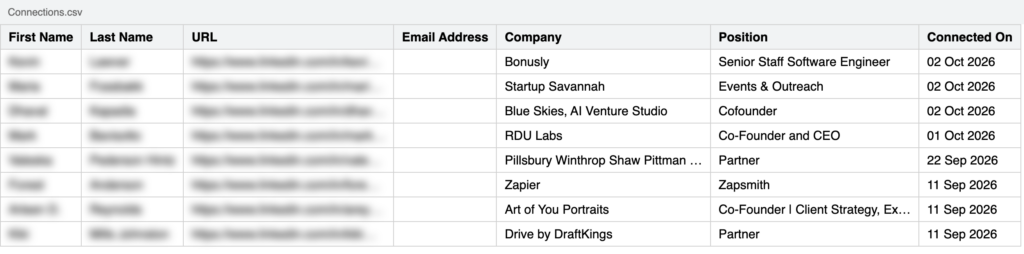
Every row is a person: first name, last name, company, title, and the date you connected. A few rows have an email address (only for people who allowed it). There’s no location, which is annoying. Company and title turn out to be plenty.
Step 2: Tell Claude what you sell
Getting the file is easy. What you tell Claude about your business decides whether the results are any good. Vague prompts get vague lists. Spell out who signs the check, and who that person listens to.
Start a new chat, attach the CSV, and paste in something like this:
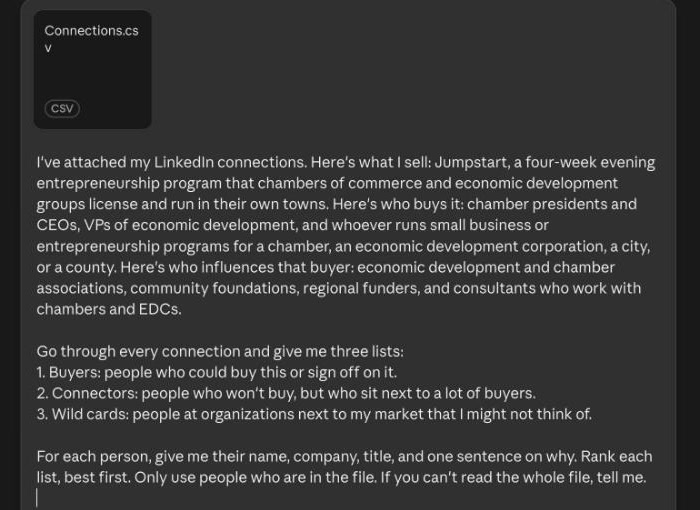
I’ve attached my LinkedIn connections. Here’s what I sell: [one or two sentences]. Here’s who buys it: [titles and types of organizations]. Here’s who influences that buyer: [associations, funders, advisors, anyone they listen to].
Go through every connection and give me three lists:
- Buyers: people who could buy this or sign off on it.
- Connectors: people who won’t buy, but who sit next to a lot of buyers.
- Wild cards: people at organizations next to my market that I might not think of.
For each person, give me their name, company, title, and one sentence on why. Rank each list, best first. Only use people who are in the file. If you can’t read the whole file, tell me.
Replace the brackets with your own details. Here’s what I filled in for my own test. I run Jumpstart, a four-week evening entrepreneurship program that chambers of commerce and economic development groups license and run in their own towns. The buyers are chamber presidents, VPs of economic development, and whoever runs small business programs for a chamber, a city, or a county. The influencers are economic development associations, community foundations, and consultants who work with chambers.
Step 3: Read the three lists
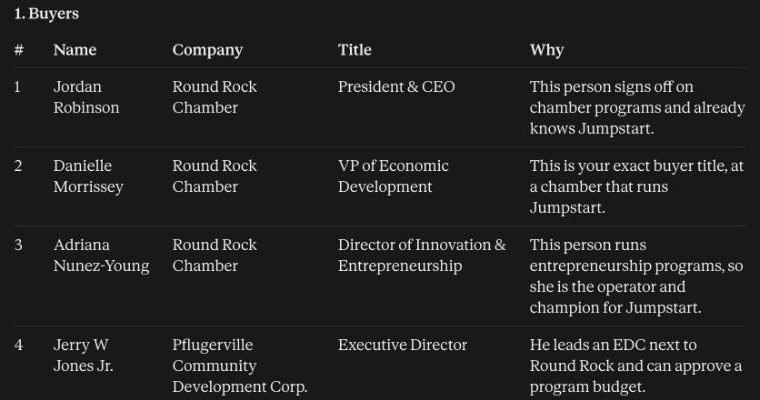
The first list is the obvious one, and it was still worth the fifteen minutes. Claude read all 6,339 rows and gave me twenty buyers. The top of the list was people I already work with: the Round Rock Chamber, where Jumpstart started, the Pflugerville Community Development Corporation next door, and the Savannah Economic Development Authority. That’s a good sign. It means Claude understood who buys. The new names came after that: the CEO of the Harlingen Economic Development Corporation in the Rio Grande Valley, the executive director of the Midland Development Corporation, and a county economic development group in rural Kentucky.
The second list is where it gets good. Connectors don’t buy from you, but they know everyone who does. At the top of mine was the director of entrepreneurship at the International Economic Development Council. I already knew him. But right behind him were two people at the Center on Rural Innovation, which works with small-town economic development groups all over the country. One good conversation with either of them beats fifty cold emails.
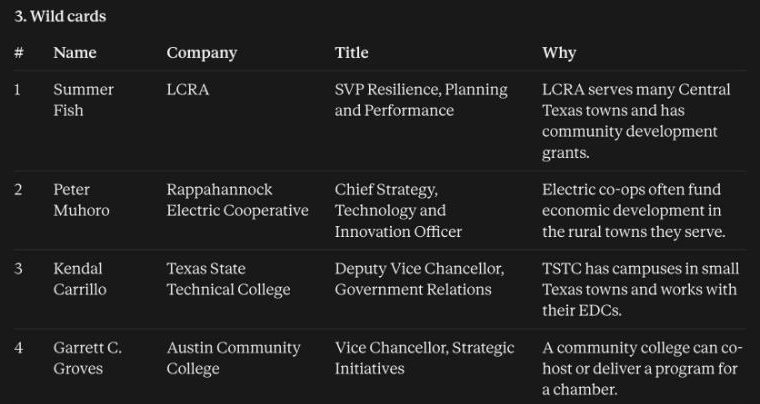
The third list is the creative one. Number two was a strategy and innovation officer at a rural electric cooperative. I never would have thought of that. But electric co-ops put real money into rural economic development, and a co-op that wants more businesses on its lines has a reason to care about new founders. Claude also pointed me to the Lower Colorado River Authority and Texas State Technical College, which has campuses in small towns all over Texas. Some wild cards are a stretch, but every one is worth a scan.
Step 4: Pick five
Don’t send forty messages. Check each profile first (titles go stale, and people change jobs), then pick the five people where you can write one honest sentence about why you’re reaching out to them in particular. Have Claude draft the notes if you want, then rewrite them so they sound like you. A warm connection goes cold fast when the message reads like a mail merge.
Not everyone on your list is the buyer. Some of them just know the buyer. That changes the message. Ask who they know, which is a much easier yes than a pitch. People like being the one who makes the intro. Make it easy for them: say exactly who you’re looking for (“whoever runs small business programs for the city”) so they can picture a name.
As always, you still need your own judgment to decide which of these leads are worth it. But clicking through thousands of profiles and thinking through each one by hand would take ten times as long. Claude does it in minutes.